Employee Scheduling Module
 GrandMaster Suite's Schedule module allows you to create optimum schedules for your organization. Use it to enhance your company's workflow in key areas such as leaves, shift swapping and replacement workers while avoiding the unnecessary costs incurred from incomplete or inconsistent scheduling practices. You can also improve employee morale and punctuality by developing and coordinating accurate, equitable schedules.
Integrate this module with GrandMaster Suite's Resource Planning module and you can establish an unlimited number of shift rotation patterns through direct input based on calendar, employee position or any other criteria specific to your organization. Keep track of all the details and automatically designate replacement staff so you have the right people in the right place at the right time.
Scheduling Module Features
The Scheduling module accomodates companies with shift scheduling using techniques that include shift rotations, ad hoc scheduling and position scheduling (using the organization charts found in the Resource Planning module). You also have the capability of restricting schedule processing to designated groups of employees. Here are some of this module's features:
Coordinate Fixed Shift Rotation
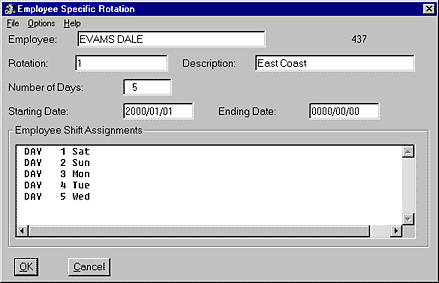
Set up multi-shift patterns for your entire organization in just minutes. If required, compile an automatic rotation period according to your specifications.
Automatic Shift Scheduling
Ensure that your people are always in the right place at the right time by integrating GrandMaster Suite's Resource Planning module. This will allow you to employ the automatic shift scheduling feature and automatically designate personnel to fill any gaps related to departmental or positional requirements.
Flexible Replacement Designate
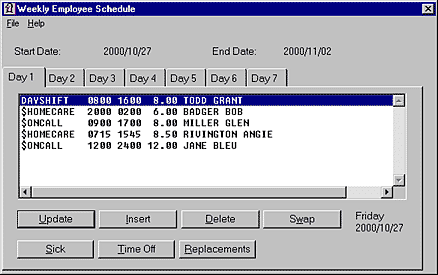
When you have employees away on leave, designate replacement workers for an hour, a day, a week, a month or more. Whether emplpoyees are away on vacation, training or other reason, you'll now avoid interruptions in your organization’s work schedule.
Flexible Scheduling
Many times, employee work schedules follow complex patterns (or sometimes no established pattern at all). So if exceptions are the rule in the scheduling practices of your organization, the Scheduling module will help you handle the task easily.
Manage Leave Scheduling
Setup alerts prior to an employee leave so you are on top of all situations. This allows you to plan for employee replacement requirements ahead of time. Identify replacements through a variety of situation criteria including seniority and special skills.
Coordinate Shift Swapping
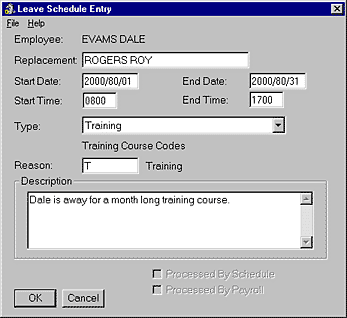
If shift swapping is a requirement in your industry, the Schedule module can easily accommodate the needs of your employees and the needs of your organization at the same time. Take control of swapped shifts and avoid the mixed results that sometimes occur when the task is left to individual employees.
Maintain Scheduling Details
When minor scheduling details or revisions are overlooked, master shift schedules can become "make shift" schedules and cost your business. The Schedule module can help you manage the details of revising your master shift schedule so you can stay on top of the temporary day to day revisions for sick leave, vacation leave and shift swapping.
Monitor Employee Seniority
If seniority is a criteria for your organization in determining the selection of employees for particular assignments, then this module is for you. Evaluate up to six different seniority lists for each work area to accommodate even the most complex, multi-union requirements. Easily differentiate from full and part-time employees and automatically flag potential costly overtime. Seniority management ensures employee equitability for your organization.
Select "On-Call" Employees
The Schedule module ensures your human resource policies regarding "on-call" employees are administered consistently and fairly. When selection from various shifts is used as a criteria to assign "on-call" employees, you can automatically select employees based on even more precise criteria such as seniority and specific skill-sets. Employees are then automatically scheduled to be "on-call" for specific activities and positions.
Schedule Reports and Updates
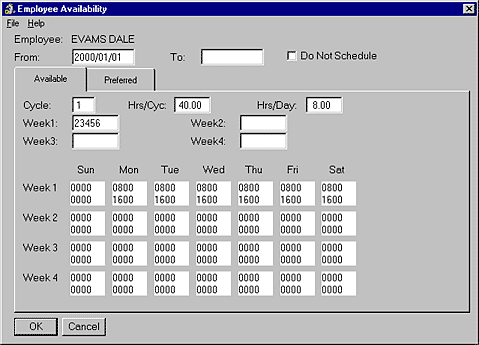
Receive comprehensive, accurate reports that can be customized to suit the specific requirements and preferences of your organization. Shift assignment details can be reviewed by employee or by group and are available in a seven day or 14, 21 or 28 day calendar format.
Home Care Scheduling
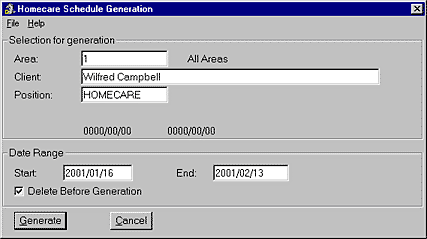
Scheduling Home Care workers for the health field can be a complicated task. This special add-on module expands the Schedule module’s capabilities by enabling the automatic scheduling of clients with employees based on user defined settings. Set up Home Care clients with services required by day and this module will match the employee to the client based on the employee seniority, availability, area of work and services. If you require replacement workers, simply view the list of replacements based on seniority requirements you have defined.
How Do I Get Started?
Click Here or choose the button below to download the complete GrandMaster Suite today! Once installed, you can begin using the program immediately (our Getting Started Guide is available to help you get up and running quickly). If you have any download or installation questions, please call 1‑800‑665‑5129 or e-mail support@canpay.com.

Licensing Information
GrandMaster Suite is yours to use free of charge as long as your payroll contains 20 employees or less (Click Here for more details). If you require payroll processing for more than 20 employees, or would like to receive Toll-Free support from CanPay, simply purchase a GrandMaster Suite license.
Click Here to review GrandMaster Suite's module pricing.
Looking for Payroll Software in Canada?
CanPay provides Payroll and HR software for thousands of companies across Canada. If your business has a unique payroll need or you are simply looking for an alternative to your current method, contact us today. We can offer you a customized solution that will suit your unique business requirements. Please call 1-800-665-5129 or send an email request to: sales@canpay.com.
|